In today’s digital work environment, many of us juggle dozens of files, folders, apps, and shortcuts every day. Over time, this leads to a cluttered, chaotic desktop — making it harder to stay focused and productive. A messy desktop isn’t just an eyesore; it can slow down your workflow and even cause stress. If you’re tired of constantly digging through digital clutter, iTop Easy Desktop is the solution you’ve been waiting for.
This powerful tool transforms your cluttered screen into a well-organized and productive workspace — effortlessly and intelligently. Whether you’re a professional, student, or casual computer user, you’ll love how much cleaner, faster, and easier your PC feels after just a few minutes with iTop Easy Desktop.
Why Desktop Organization Matters?
Your desktop is often the first thing you see when you boot up your computer. When it’s flooded with icons, random downloads, screenshots, and temporary files, it becomes difficult to locate what you need quickly. Over time, this disorganization leads to:
- Wasted time searching for files
- Lower productivity
- Mental clutter and frustration
- A less efficient system performance
While many people attempt to organize manually, it often doesn’t last. That’s why an intelligent, automated solution like iTop Easy Desktop is so helpful.
What is iTop Easy Desktop?
iTop Easy Desktop is a lightweight, free-to-use desktop management tool developed by iTop. It provides smart organization tools that automatically sort, group, and manage your desktop content into clean categories. It creates a distraction-free environment while still keeping your files within reach.
The tool is perfect for those who:
- Struggle with desktop clutter
- Frequently download or create files on the desktop
- Use multiple files or programs daily for work or study
- Prefer a visual yet minimalistic layout
Smart Features That Make Desktop Cleanup Effortless
Let’s explore the smart and intuitive features that make iTop Easy Desktop a must-have for every PC user.
1. One-Click Smart Grouping
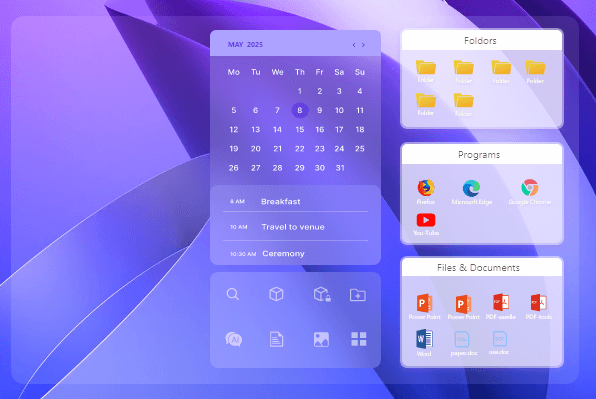
With one click, iTop Easy Desktop scans your screen and automatically organizes files into neat boxes based on their type — documents, images, folders, shortcuts, and more. This saves you hours of manual dragging and sorting.

2. Customizable Layouts
Prefer to keep work files on the left and entertainment apps on the right? With customizable grid layouts, you can position your grouped sections exactly how you like. This gives you full control over how your desktop looks — without the mess.
- Productivity-Enhancing Widgets
iTop Easy Desktop integrates a variety of widgets right onto your desktop to keep essential information in view.
Schedule: A calendar widget that can sync with your Google Calendar, helping you keep track of to-dos and deadlines.
iNotes: A digital sticky note tool for quickly jotting down ideas and reminders.
Clock: Displays the time in a clear and customizable format.
Weather: Provides real-time weather information for a specified location.
iPomodoro: A time management tool based on the Pomodoro Technique to help you stay focused on tasks.
Quick Tools: A specialized box that offers fast access to the key features of iTop Easy Desktop itself.

- Live/Static Wallpapers
With iTop Easy Desktop, you can fully personalize your workspace to match your style. Bring your desktop to life with Lively Wallpapers, which supports stunning dynamic videos and HTML files. If you prefer a simpler look, you can easily choose from classic static images or clean solid colors.

- Auto-Hide Function
For a truly distraction-free environment, enable the Auto-Hide feature. With a double-click, it tucks away your desktop icons when they’re not in use, letting you focus on your tasks while still keeping everything a hover away.

- Multi-Screen Support
Using more than one monitor? iTop Easy Desktop makes it easy to maintain organization across multiple displays. Each screen gets its own layout — all fully customizable and manageable through a single interface.
- Folder Protection
Your sensitive folders can be hidden or protected to keep them private from prying eyes, whether you’re sharing your PC with others or working in public spaces.
Who Can Benefit from iTop Easy Desktop?
This tool is ideal for:
- Students juggling lectures, assignments, and project files
- Office workers who manage reports, spreadsheets, and presentations
- Graphic designers with dozens of images and creative assets
- Gamers or streamers looking for a cleaner setup without losing quick access to games or tools
- Remote workers managing client files, meeting apps, and tools from a single machine
Easy Setup & Use
You don’t need to be tech-savvy to start using iTop Easy Desktop. Here’s how simple it is:
- Download and install from the official site
- Launch the program
- Click on “Smart Arrange” to let the software auto-organize your screen
- Customize your layout, colors, icon sizes, and more
- Enable features like Auto-Hide, Quick Access, or Folder Locking as needed
The program runs smoothly in the background and uses minimal system resources, so it won’t slow down your PC.
Final Thoughts
If your desktop is a digital disaster, it’s time to bring order and calm with iTop Easy Desktop. From smart file grouping and layout customization to quick access and privacy features, it offers everything you need to maintain a clean, efficient, and stress-free digital workspace.